


Does Your Community Appear in Support Search Results?
TL:DR: Not appearing in support search is critically undermining the value of your community (especially in an AI world)
I’ve spent a lot of time this past week reviewing the support sites of plenty of organisations and seeing if and where community links appears.
The sad answer is, most of the time, they don’t.
This raises three key questions.
- How should community appear in support search results?
- Why doesn’t community appear in support search results?
- How can we make community appear in support search results?
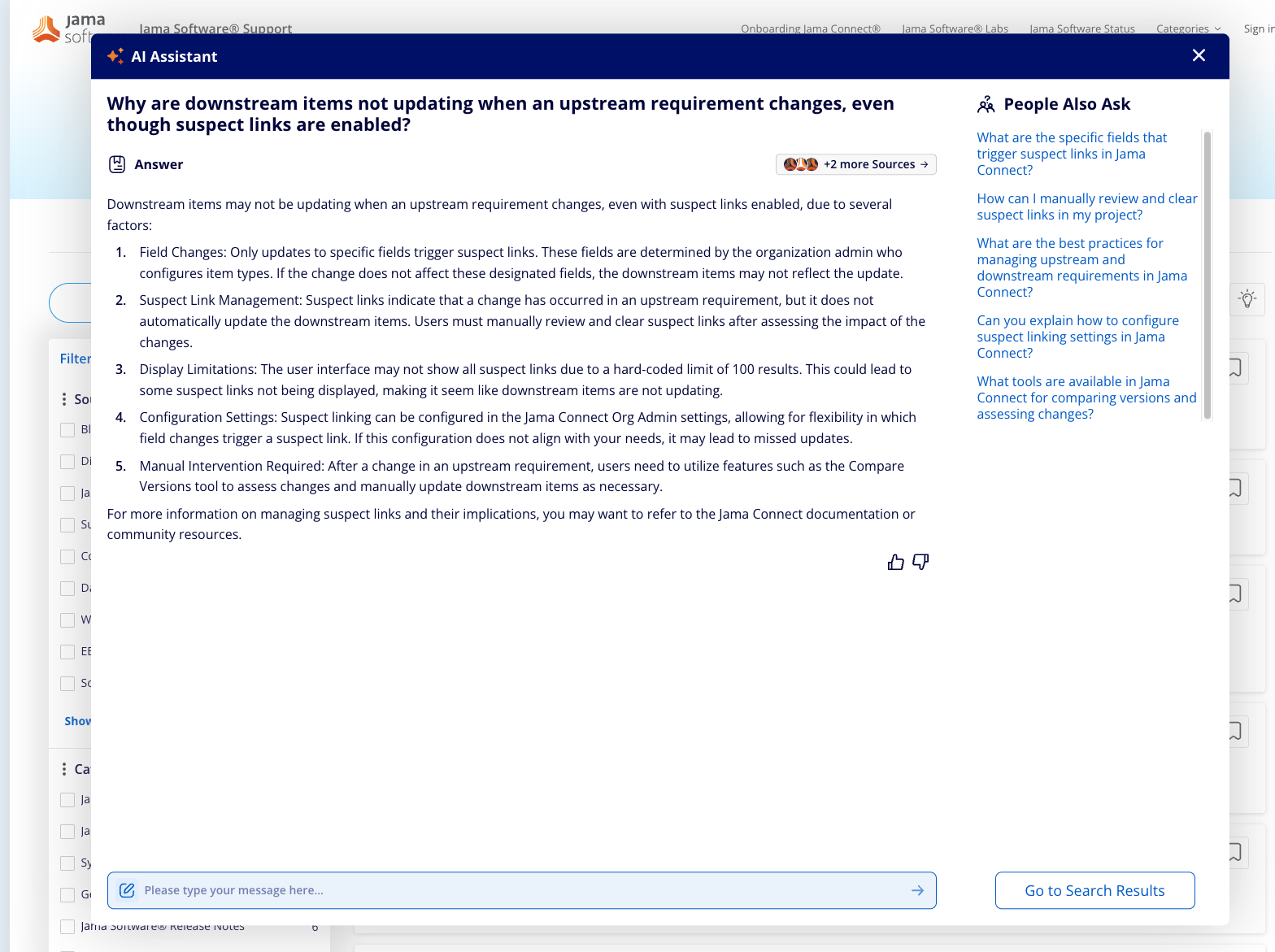
In both examples, when you type a question into the support bar (not just community support), it generates results from both community and non-community sources.
In this case, five sources are used, two of which (including the one deemed most relevant) are community.
This is where support communities need to be in the future. It’s the best of community combined with AI and the organisation’s knowledge base(s).
What’s frustrating is that most organisations aren’t anywhere close to this right now.
And it’s important to understand why.
Why Doesn’t Community Appear in Support Search?
To understand this, we need to understand how support search, especially RAG (retrieval augmented generation) search, works.
I’m not talking about the neural-network level or how model weights are trained. That’s far beyond my expertise.
I’m talking about the simple mechanics of how your organisation’s AI tools actually retrieve information and generate answers from company docs and, ideally, your community.
How Support Search Works (for most organisations)
Here’s the briefest possible explanation of how AI likely works in your organisation today.
In most organisations, a separate (often vendor-managed) knowledge index (database) is created.
This index ingests help centre articles, documentation, knowledge base content, and often support tickets (this is very similar to how search engines function).
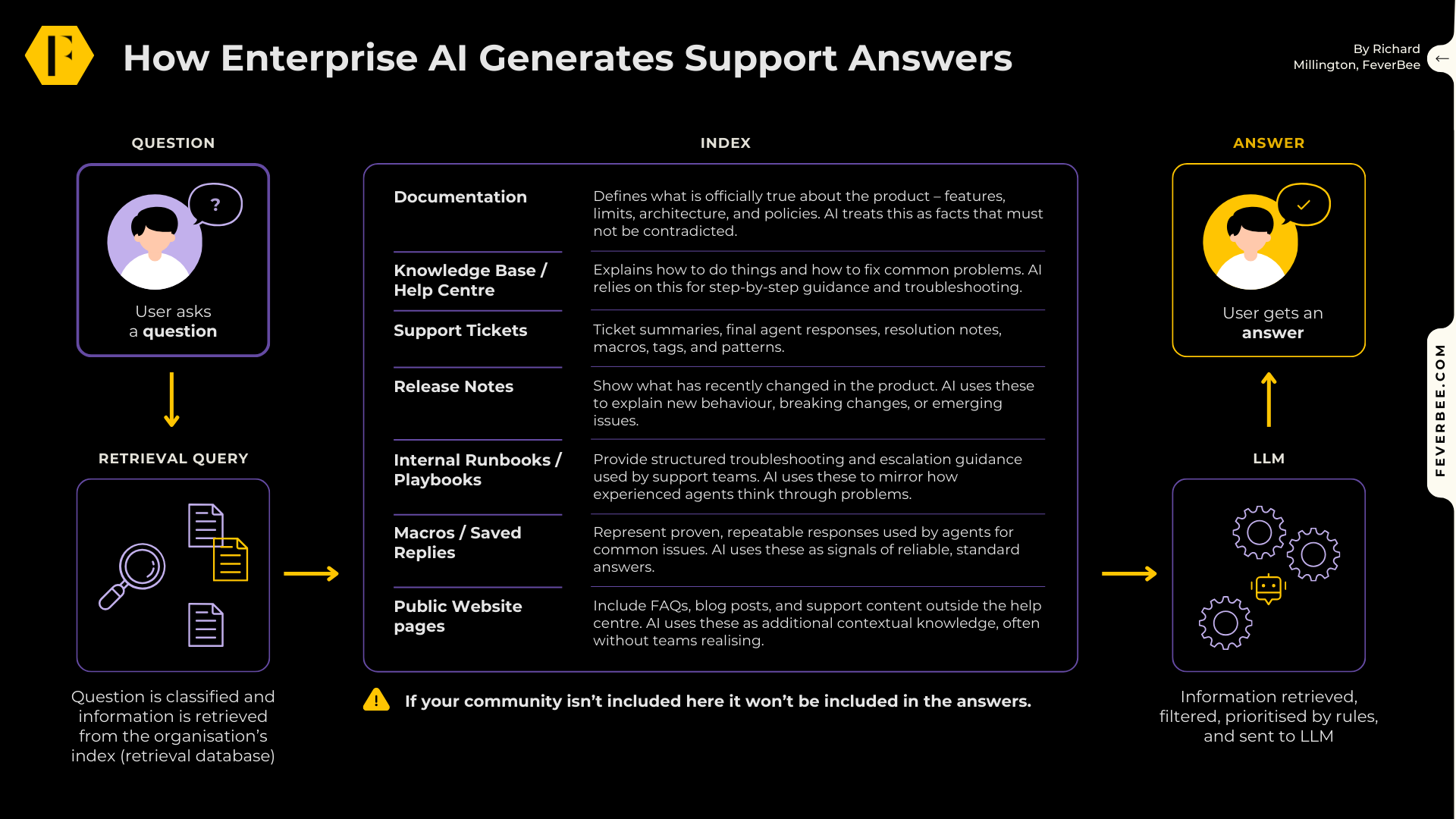
Now, when a question is entered in a support search box, chatbot or any other channel, the system classifies the question type using simple rules and decides which sources to retrieve information from in the index (and how to prioritize each source).
This information is then passed to a large language model (GPT, Gemini, Claude, etc.) to generate a human-sounding answer.
This is simple enough – so why is community often excluded?
The Annoying Technical Problem With Including Community
There are two reasons. One is technical, the other is perceptual.
The technical problem is that these databases (from where the information is retrieved) aren’t typically designed to support discussion threads.
They’re designed for help centre articles, documentation, knowledge base content, and, often, support tickets. There typically isn’t a standard format to accept discussion threads.
This alone means many organisations don’t try to include community.
But even if they did, they face a new problem.
For community content to be ingested, it often has to be either:
- Crawled like a web page.
- Exported and reshaped into something that looks like a help centre article.
- Stripped down into a question + answer format.
The problem is that converting a discussion thread into this format strips it of important data.
You lose metadata, which makes it harder to trust responses; you struggle to handle competing answers to a solution or multi-turn reasoning, which can lead to an answer.
The Perceptual Problem With Including Community
A more common challenge is many support staff don’t want community included in search results.
They think including community data is risky and might lead to their RAG search giving bad advice and incorrect information.
The problem with this is if they don’t include community you will certainly give people bad and incomplete advice.
Here’s a real world example, but in case you hate videos, here’s a theoretical example.
Imagine a customer asks:
→ “Why does SSO fail when using Okta with more than 50,000 users?”
[It doesn’t, but this is just an example!]
In your community, you might have a discussion post where:
- One member shares a failed attempt.
- Another shares a partial workaround.
- A staff member explains an undocumented limitation.
- Several others confirm the same issue in large environments.
- Someone notes that the docs don’t mention this.
This thread contains experiential, contextual, and emerging knowledge.
But the AI system doesn’t see the thread because it’s not included in the retrieval database, so it might generate an answer like
→ “SSO failures with Okta are typically caused by configuration issues such as incorrect redirect URLs, certificate mismatches, or timeout settings. Please ensure that your Okta configuration matches the steps outlined in our SSO setup documentation. You may also want to verify token expiry settings and confirm that your integration follows the supported parameters. If the issue persists, contact support for further assistance”
The answer sounds right and plausible, but it’s completely wrong.
The issue wasn’t configuration; it was an undocumented scalability limit that only appears at very large user volumes. That’s experiential, edge-case, and contextual knowledge. The exact kind that exists in the community – but only when the context is included!
This leads to greater dissatisfaction with the brand as its own tool gives the wrong answer.
And yet, the answer is sitting right there in the community.
Now multiply this by hundreds and thousands of questions…you see the problem.
In short, when community isn’t included, everyone loses.
Learn How To Overcome The Support Search Problem
Our AI Ready Communities program will teach you how to overcome the critical challenges preventing community from being included in your knowledge index.
In my opinion, this is the biggest single win for most community professionals today.

The program combines:
Live working sessions
Structured frameworks and templates
Guided analysis of your own community
Peer discussion and comparison
Direct input from FeverBee
Guest experts
What’s Included?
3 months of guided cohort sessions
12 personal guidance sessions
Access to FeverBee’s AI readiness frameworks and tools
Peer learning with a small group of comparable organisations
Direct feedback and facilitation from FeverBee
Applied work focused on your community
Investment: $4,000 per organisation (and you can enrol unlimited staff members)